I try to keep my Docker Desktop (on my personal dev machine) up-to-date. It updates frequently and I’m generally a fan of keeping my dev software on the latest version. So when I noticed an available update for Docker Desktop, I didn’t hesitate to update. That was a mistake - 4.75.0 broke my WSL integration.
The Problem
I tend to do all my development in WSL2 and dev containers. Thus, Docker (more so the Docker CLI) is a key part of my environment. After updating to Docker Desktop 4.75.0 I started to get this error:
|
|

Just fantastic! I restarted Docker Desktop - same problem. I rebooted - same problem. I uninstalled Docker Desktop, rebooted and installed Docker Desktop - same problem. 😠
After questioning some life choices, I finally found the right thread which led me to a solution. A GitHub issue pointed me to the Docker Desktop release notes which contained a subtle statement under “Bug Fixes and Enhancements”:
|
|
I’m not sure how that is a “bug fix” or an “enhancement”, but sure . . . whatever.
The Fix
The fix is relatively simple. Within Docker Desktop, navigate to Settings and then the Resources section. The Enable integration with my default WSL distro needs to be checked (it was unchecked after the update).
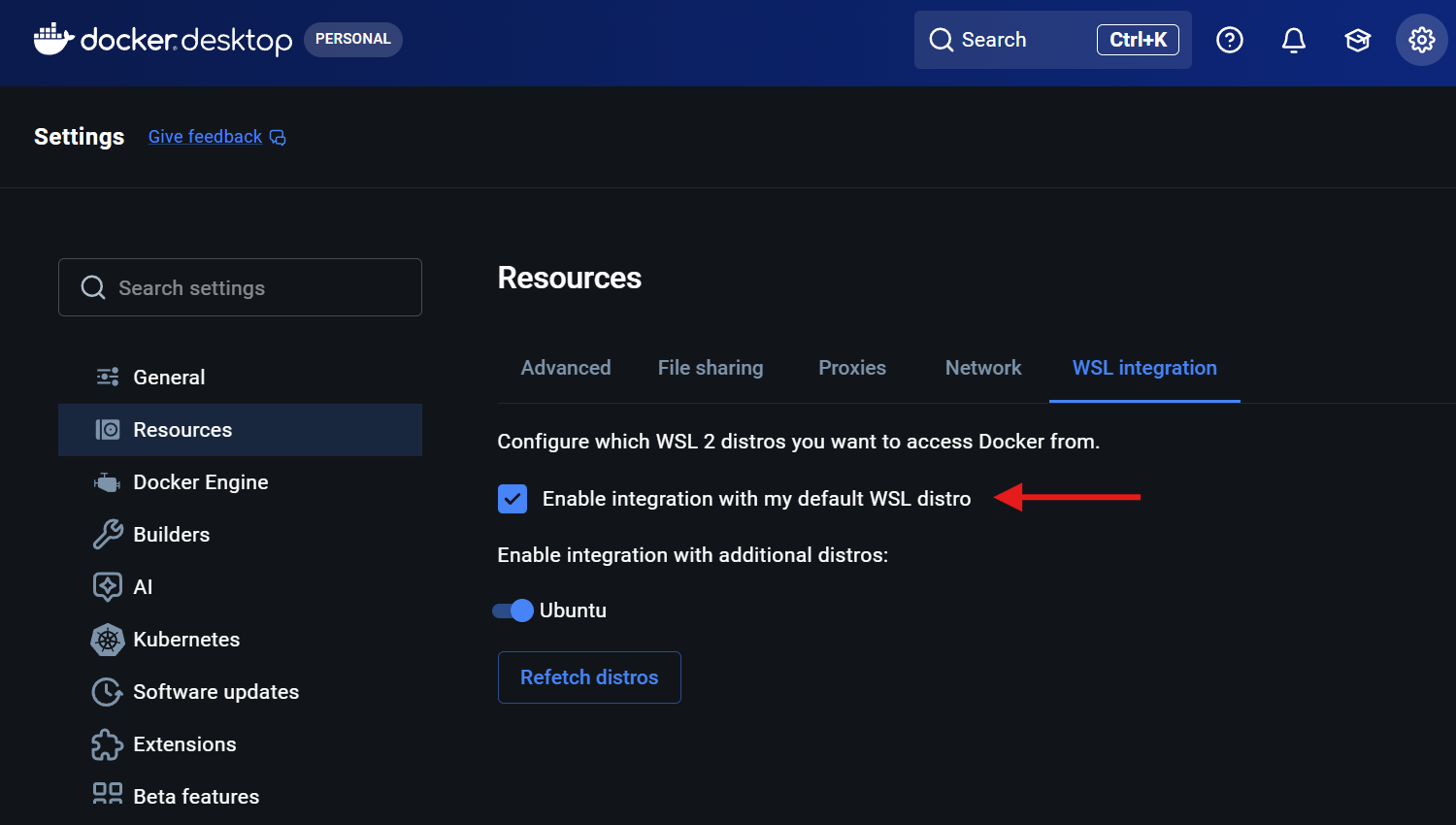
Once I did that, I was back in business!